Home Inventory Checklist
Use this home inventory checklist to document rooms, storage bins, valuables, photos, receipts, serial numbers, and hidden storage.
By Nick Stephan · Co-Founder, Totely
May 20, 2026 · Updated June 6, 2026 · 13 min read
Most people know they should have a home inventory.
The harder question is where to start.
Do you photograph every room? Write down every item? Save receipts? Record serial numbers? Open every closet? Include storage bins, moving boxes, the garage, the attic, the basement, under-bed storage, and the storage unit? What about sentimental items, family recipes, jewelry, tools, bikes, holiday lights, craft supplies, or kids' clothes packed away by size?
A useful home inventory checklist should not make you feel like you need to document your entire life in one afternoon. It should give you a simple way to capture what you own, where it lives, and what details may matter later.
The best checklist is practical, visual, searchable, and easy to update. It should include visible belongings, hidden storage, photos, locations, receipts when available, serial numbers where useful, and notes for items that are valuable, fragile, sentimental, seasonal, or hard to replace.
This article is practical organization guidance, not insurance, legal, or financial advice. Insurance policies, documentation requirements, limits, and exclusions vary. Check your own policy and insurer guidance for what documentation you may need.
Quick Links
- Start With Photos of Each Room
- Add High-Value and Hard-to-Replace Items
- Record Serial Numbers, Receipts, and Model Details
- Document Hidden Storage Areas
- Include Seasonal, Sentimental, and Stored Items
- Create Room-by-Room Checklist Categories
- Keep Your Home Inventory Checklist Easy to Update
- How Totely Makes a Home Inventory Checklist Searchable
- Home Inventory Checklist FAQs
Start With Photos of Each Room
Start with photos before you worry about perfect item details.
Photos give you a fast visual record of what is in your home. Walk room by room and take wide photos first. Then take closer photos of important items, closets, shelves, cabinets, drawers, and storage areas.
The NAIC home inventory guidance recommends quickly capturing pictures of belongings and grouping them by room or category. That is a helpful way to think about your first pass: capture the room, then add detail where it matters.
First-Pass Room Photos
Living room
Furniture, rugs, artwork, electronics, speakers, game consoles, lamps.
Kitchen
Appliances, small appliances, cookware, specialty tools, dishes, cabinets.
Bedrooms
Furniture, computers, cameras, phones or tablets, jewelry or valuables, clothing, sentimental items.
Office
Computers, monitors, printers, cameras, musical instruments, electronics, documents with cautious handling.
Garage or storage
Tools, bikes, outdoor gear, camping gear, sports gear, storage bins, moving boxes.
You do not need to document every spoon or sock. The goal is to create a clear visual record, then add details for items that would be harder to remember, replace, identify, or explain later.
For a no-spreadsheet approach, see create a home inventory without a spreadsheet.
Add High-Value and Hard-to-Replace Items
After your room photos, focus on items that are valuable, hard to replace, easy to forget, or important to identify.
That may include furniture, electronics, appliances, small appliances, tools, bikes, outdoor gear, musical instruments, computers, cameras, gaming consoles, phones, tablets, artwork, rugs, baby gear, jewelry or valuables, and specialty hobby equipment.
Use cautious wording with valuables. A home inventory can help you remember and document what you own, but it does not replace appraisals, professional valuations, insurance policy documents, receipts, or insurer-specific requirements.
A high-value item checklist might include:
Item name or description Example: "Canon camera body," "blue sectional sofa," "cordless drill set," "mountain bike."
Photo Take a clear photo of the item and any identifying details.
Room or exact location Example: "office closet," "garage wall rack," "bedroom dresser," "living room."
Category Furniture, electronics, appliances, jewelry or valuables, tools, bikes, artwork, instruments.
Receipt or proof of ownership where available Save purchase records, confirmation emails, or receipt photos when you have them.
Serial number or model number where useful Especially for electronics, appliances, tools, bikes, cameras, computers, and gaming systems.
The Insurance Information Institute recommends describing recorded items, noting where you bought them, recording make and model, what you paid, and any other useful detail that could help if you need to make a claim. Keep that idea in mind, but do not let it stop you from starting small.
A photo now is better than a perfect inventory you never create.
Record Serial Numbers, Receipts, and Model Details
Some items deserve more detail than others.
For major appliances, electronics, computers, cameras, tools, bikes, musical instruments, gaming consoles, and higher-value household items, serial numbers and model numbers can be useful. The Insurance Information Institute notes that serial numbers are often found on the back or bottom of major appliances and electronic equipment and can be a useful reference.
The Wisconsin Office of the Commissioner of Insurance also recommends keeping receipts and recording serial numbers as part of a personal property home inventory.
Useful details may include:
Purchase date or approximate age If you do not know the exact date, an estimate is still better than nothing.
Receipt or proof of ownership Receipt photo, order confirmation, invoice, warranty document, or purchase email.
Serial number or model number Useful for appliances, electronics, tools, computers, cameras, and similar items.
Estimated value or replacement cost where appropriate Use cautious estimates and check your insurer's guidance.
Appraisals or professional valuations where applicable For jewelry, art, collectibles, antiques, or other specialty items, professional documentation may matter.
Do not make every item complicated. A couch may need a photo and approximate purchase date. A laptop may need a serial number. A family recipe may need a note. A sentimental item may need a story. A storage bin may need a number and location.
The checklist should match the item.
Document Hidden Storage Areas
A home inventory that only covers visible rooms will miss a lot.
Hidden storage often holds the items people forget they own: storage bins, moving boxes, holiday decor, Christmas decorations, holiday lights, camping gear, craft supplies, baby clothes, kids' clothes, seasonal clothing, winter coats, beach towels, sports gear, sentimental items, family recipes, guest linens, household backstock, tools, small appliances, and important documents.
Check these areas:
Closets Hall closets, bedroom closets, linen closets, entry closets, utility closets.
Garage storage Shelves, wall racks, cabinets, tool areas, storage bins, bikes, outdoor gear.
Attics and basements Seasonal decor, old boxes, sentimental items, furniture, stored appliances.
Under-bed storage Seasonal clothing, kids' clothes, guest linens, extra blankets, keepsakes.
Storage units Moving boxes, furniture, holiday bins, household overflow, seasonal gear.
Moving boxes Kitchen extras, small appliances, books, cords, tools, sentimental items.
For hidden storage, use numbers. A tote labeled "holiday" is less helpful than a numbered bin with a photo record.
Bin 1 Location: Garage shelf, top row Contents: holiday lights, extension cords, replacement bulbs, batteries, tape.
Bin 2 Location: Under bed, left side Contents: baby clothes, kids' winter clothing, snow pants, boots, seasonal shoes.
Bin 3 Location: Hall closet, top shelf Contents: guest linens, extra blankets, winter bedding, pillowcases.
This is where a checklist becomes truly useful: it helps you document what is stored, not just what is visible.
See how to keep track of storage bins and storage tote labels that work.
Include Seasonal, Sentimental, and Stored Items
Seasonal and sentimental items are easy to overlook because they are not part of everyday life.
But they often matter.
Include seasonal clothing, winter coats, beach towels, camping gear, sports gear, holiday decor, Christmas decorations, holiday lights, wrapping supplies, guest linens, school papers, baby gear, kids' clothes, family recipes, photo albums, heirlooms, keepsakes, and small objects with a story.
These items may not need the same details as a laptop or appliance, but they do need context.
Family recipes
Location: Keepsake Box 4, hall closet top shelf. Notes: handwritten recipe cards from Grandma.
Kids' clothes
Location: Under-bed Bin 2. Notes: 5T winter clothes, snow pants, boots, holiday pajamas.
Holiday decor
Location: Garage Bin 1. Notes: outdoor lights, extension cords, replacement bulbs, gift tags.
Sentimental keepsakes
Location: Bedroom closet, top shelf. Notes: school papers, letters, photo albums, small heirlooms.
The goal is not to turn meaningful items into cold inventory. It is to make sure you can find them when they matter.
Create Room-by-Room Checklist Categories
A room-by-room checklist helps you move through the house without getting overwhelmed.
Use it as a guide, not a rulebook.
Room-by-Room Checklist Categories
Living Room
Furniture, rugs, artwork, lamps, electronics, speakers, game consoles, bookshelves, decor.
Kitchen and Dining
Appliances, small appliances, cookware, dishes, specialty tools, dining furniture, serving pieces.
Bedrooms
Furniture, clothing categories, jewelry or valuables, electronics, rugs, artwork, sentimental items.
Office or Workspace
Computers, monitors, printers, cameras, phones or tablets, documents with cautious handling, office furniture.
Garage, Shed, or Utility Area
Tools, bikes, outdoor gear, camping gear, sports gear, garden tools, storage bins, household backstock.
Closets and Storage Zones
Guest linens, extra blankets, seasonal clothing, baby clothes, kids' clothes, holiday decor, moving boxes.
Attic, Basement, or Storage Unit
Stored furniture, seasonal decor, keepsakes, boxes, bins, appliances, long-term storage.
For each room or zone, capture photos first. Then add details only for items where the details matter.
Keep Your Home Inventory Checklist Easy to Update
A home inventory checklist should not be something you create once and forget.
It should be easy to update when life changes.
Update it when you:
- Buy a major item
- Replace an appliance, electronic, bike, tool, or piece of furniture
- Move items into storage
- Donate, sell, or discard stored items
- Pack or unpack moving boxes
- Rotate seasonal clothing, holiday decor, or camping gear
- Store baby clothes, kids' clothes, school papers, or sentimental items
- Move bins between closets, garages, attics, basements, under-bed storage, or storage units
A useful checklist may include a date last updated if available. For shared households, it can also be helpful to know who updated a record, especially if one person moved items or changed a storage bin.
This should not become a second job.
The easiest update is often: take a new photo, adjust the key contents, and confirm the location.
If updating the checklist is simple, you are more likely to keep using it.
For renters, pair this checklist with home inventory for renters insurance guidance.
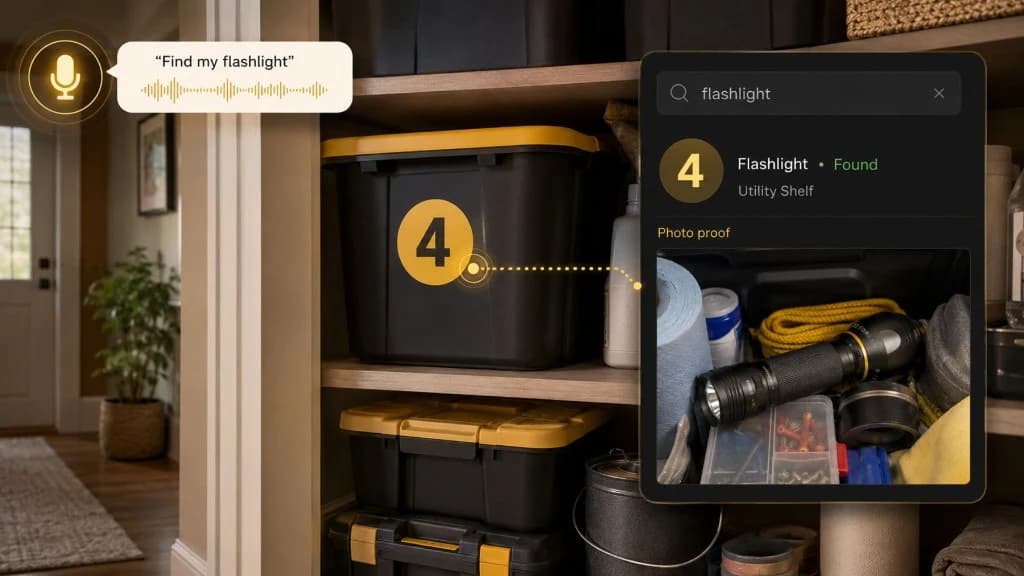
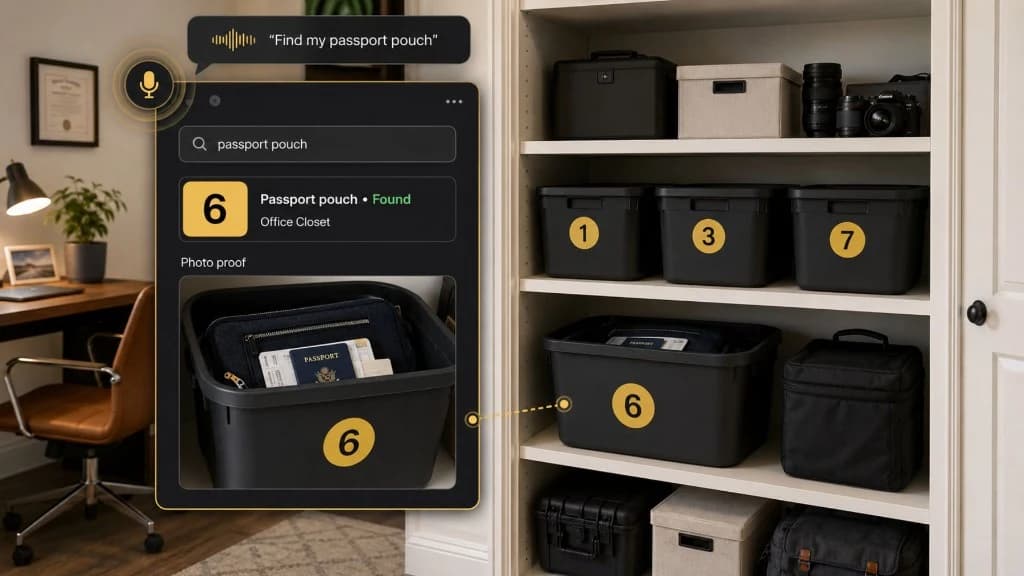
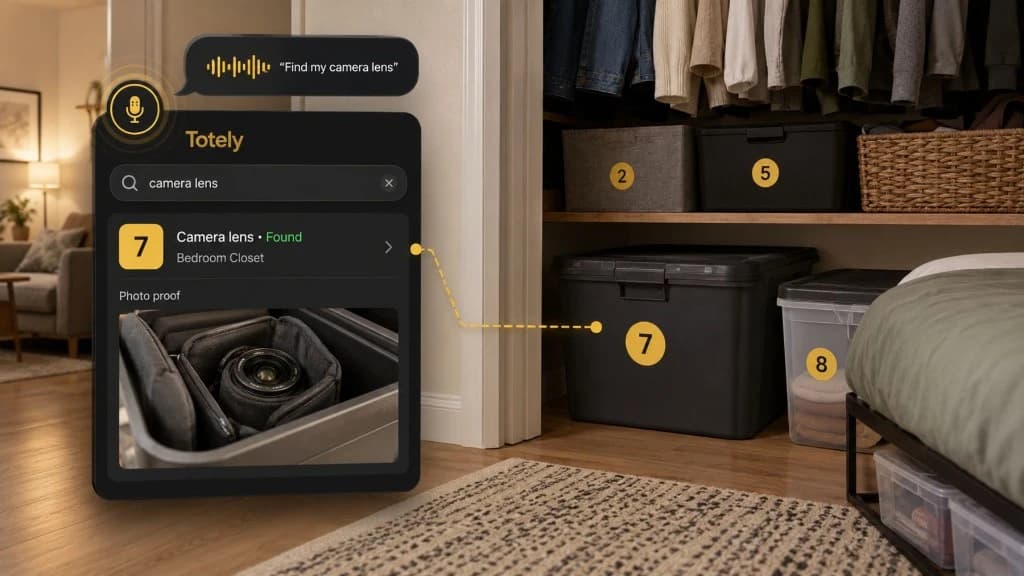
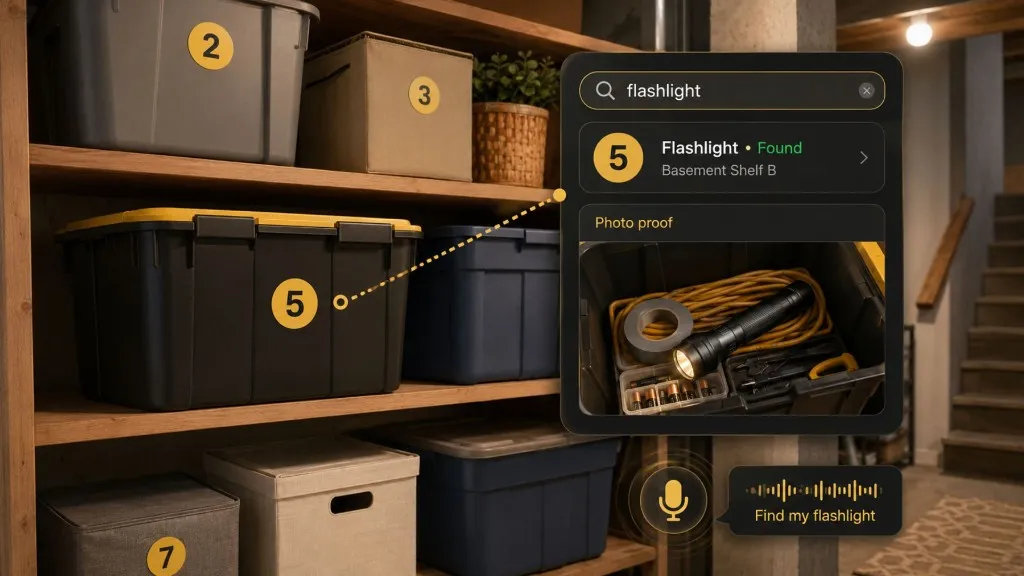
How Totely Makes a Home Inventory Checklist Searchable
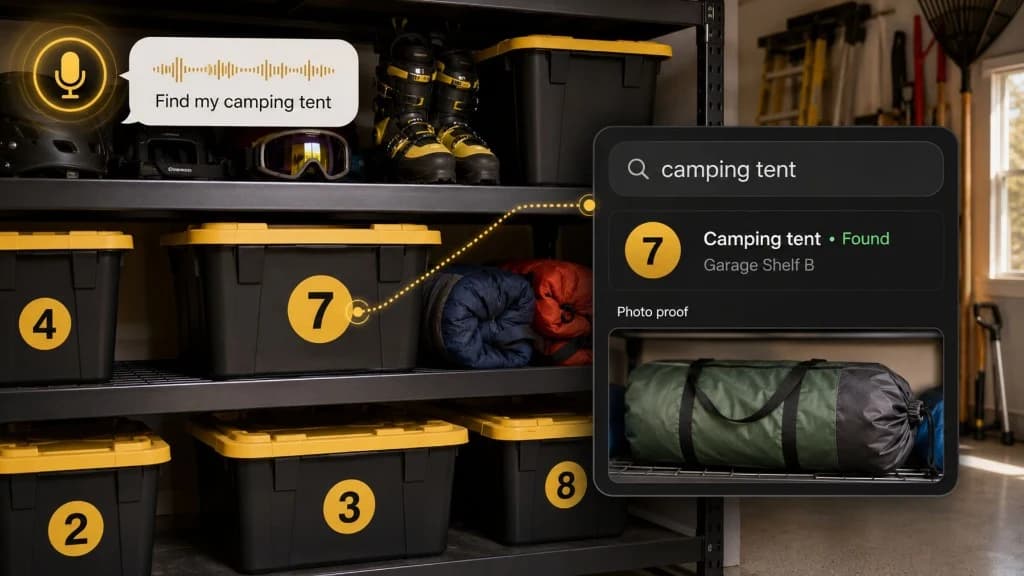
A home inventory checklist works best when it is visual, searchable, and easy to update.
Totely helps you build that kind of checklist without requiring QR codes, barcodes, or manual entry of every item.
Here is the simple flow:
Choose a room, storage area, tote, bin, box, shelf, or zone
to inventory first.
Number containers or storage zones when helpful
so hidden items have a clear identity.
Snap a photo
of the room, item, shelf, bin, or storage area.
Let AI build the first item list
from what it can see.
Review or edit if needed
so the record matches how you would search later.
Add notes for receipts, serial numbers, model details, sentimental items, fragile items, or high-value items
when useful.
Save the exact location
such as "garage shelf top row," "hall closet," "under bed left side," "attic shelf," or "storage unit front shelf."
Search naturally later
for "gaming console," "holiday lights," "baby clothes," "bike," "family recipes," "guest linens," or "serial number."
Use photo proof
to confirm what is inside or where an item lives.
Totely does not replace receipts, appraisals, insurance policy documents, official claim records, professional valuations, serial/model documentation, or insurer-specific requirements.
It simply reduces the maintenance friction of keeping your inventory useful.
Compare approaches in home inventory app vs spreadsheet, or try the One-Tote Test on one bin to start.
A Home Inventory Checklist You Can Copy
Use this as a simple starting template.
A Home Inventory Checklist You Can Copy
Room or Zone
Example: living room, kitchen, garage, hall closet, under-bed storage, attic shelf, storage unit.
Item Name or Description
Example: sectional sofa, laptop, air fryer, bike, camera, holiday lights, baby clothes.
Photo
Wide room photo, close-up item photo, bin contents photo, receipt photo if useful.
Exact Location
Example: garage shelf top row, hall closet top shelf, under bed left side, storage unit front shelf.
Storage Bin or Tote Number
Example: Bin 1, Tote 4, Moving Box 8, Shelf Zone 2.
Category
Furniture, electronics, appliances, tools, outdoor gear, clothing, seasonal decor, sentimental items, household backstock.
Purchase Date or Approximate Age
Useful for furniture, electronics, appliances, tools, bikes, and higher-value items.
Receipt or Proof of Ownership
Receipt, email confirmation, invoice, warranty, photo, or other record where available.
Serial or Model Number
Useful for appliances, electronics, computers, cameras, gaming consoles, tools, and similar items.
Estimated Value or Replacement Cost
Use cautious estimates and check your insurer's guidance.
Notes
Fragile, sentimental, seasonal, hard to replace, needs appraisal, includes family recipe, stored with related items.
Last Updated
Useful when bins move, items are replaced, or records are shared by a household.
You do not need to fill every field for every item.
Start with photos, item names, and locations. Add more detail where it matters.
Learn more on the home inventory app page.
Home Inventory Checklist FAQs
What should be included in a home inventory checklist?
A home inventory checklist should include item names or descriptions, photos, room or exact location, category, and storage bin or tote number when applicable. For higher-value or hard-to-replace items, add receipts, serial numbers, model numbers, purchase dates, appraisals, estimated value where appropriate, and useful notes.
How detailed should a home inventory be?
Your home inventory should be detailed enough to help you identify what you own and where it lives. Everyday items may only need a photo and description, while electronics, appliances, jewelry or valuables, tools, bikes, artwork, and specialty items may need additional documentation.
Are photos enough for a home inventory checklist?
Photos are a strong starting point, but they work best with simple notes and locations. For some items, especially electronics, appliances, valuables, tools, bikes, computers, cameras, or musical instruments, receipts, serial numbers, model numbers, or appraisals may also be useful.
Should I include items stored in bins, closets, or storage units?
Yes. Hidden storage is often where important belongings are forgotten. Include storage bins, moving boxes, closets, garages, attics, basements, under-bed storage, and storage units, and record the exact location of each container or zone.
How often should I update my home inventory checklist?
Update your checklist when you buy, replace, move, donate, sell, store, or remove meaningful items. Good update moments include major purchases, moving, seasonal swaps, holiday storage, renovations, new baby gear, kids' clothing changes, and storage bin updates.
How can Totely help with a home inventory checklist?
Totely helps you start with photos, number containers or zones, let AI build the first item list, review or edit details, save exact locations, add notes where useful, and search naturally later. Photo proof helps you confirm what is inside or where an item lives.
Start With One Room, Then Keep Going
A home inventory checklist does not need to be finished in one day.
Start with one room. Or one closet. Or one storage bin. Take photos. Add the details that matter. Save the location. Come back later and keep going.
With Totely, your checklist can become visual, searchable, and easier to maintain, so furniture, electronics, appliances, small appliances, tools, bikes, outdoor gear, camping gear, sports gear, craft supplies, jewelry or valuables, artwork, rugs, musical instruments, computers, cameras, gaming consoles, phones or tablets, baby gear, kids' clothes, seasonal clothing, holiday decor, Christmas decorations, sentimental items, family recipes, important documents, guest linens, household backstock, storage bins, moving boxes, closets, garages, attics, basements, under-bed storage, and storage units are easier to find and remember.
The best inventory is not the most complicated one.
It is the one you will actually keep updated.